

Your error monitoring tool found a bug. Now what?
For most teams, the answer is the same thing it has been for years: copy the stack trace, find the file, read the code, build a mental model of what went wrong, write the fix, write or update a test, push, and wait for CI. That process hasn’t changed much since error tracking became a category. The tools got better at telling you something broke. They never got better at fixing it.
Rollbar Resolve changes that. Starting today, Resolve doesn’t just tell you what went wrong or why. It reads your codebase, writes a fix, runs your tests in an isolated environment, and opens a pull request with verified changes. You review it like any other PR from a teammate, with the test results right there on the PR.
TL;DR
- Rollbar Resolve is a verified fix agent for production errors. It reads your code, identifies the root cause, writes a fix, and runs your tests, then opens a PR with the results attached.
- Fixes are exercised in ephemeral dev environments. You get PRs with your own test results attached, not theoretical patches.
- No per-seat add-on. Resolve runs on the same AI credit system as Root Cause Analysis, and during the beta Essentials and Advanced include credits to try it with.
- This completes Rollbar’s error lifecycle: detect with Session Replay, diagnose with AI Root Cause Analysis, fix with Resolve. No other error monitoring platform offers all three in one product.
What Resolve actually does
When a production error hits Rollbar, Resolve can pick it up automatically or on your signal. Here is the sequence:
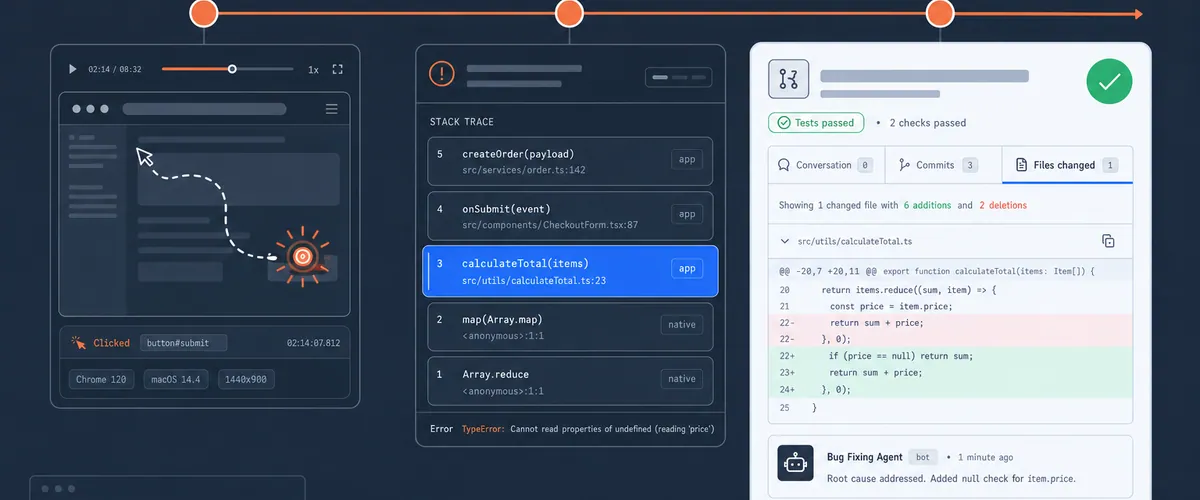
- Reads the error in context. The agent starts with everything Rollbar already knows: the stack trace, the error grouping, the telemetry timeline, the Session Replay if one exists, and the AI Root Cause Analysis. It has the full picture before it touches your code.
- Reviews your codebase. The agent connects to your repository through your existing GitHub integration and traces the error back through your source. It identifies the specific code path responsible, not just the frame that threw.
- Writes a targeted fix. Based on the root cause analysis and your actual code, the agent generates a code change designed to resolve the issue.
- Runs your tests. This is the part that matters most. The agent applies the change in an ephemeral dev environment and runs your test suite against it. The results come with the PR, so you see them before you review the diff.
- Opens a pull request. The agent opens a PR with the fix, the test results, and the context from the root cause analysis, so you can see how the suite did before you review the diff. You review it the way you review any PR. Your working branches are never touched.
And coming soon, the agent learns from your feedback with every merge. Accept a fix, and it gets better at understanding your codebase and coding patterns. Reject one, and it adjusts.
The difference between a suggestion and a verified fix
This is where the line gets drawn between what Rollbar does and what other tools in this space offer.
Sentry’s Seer can analyze an issue, identify a probable root cause, and generate a code change. It can open a PR. But the fix it produces is a draft that still needs you to verify whether it actually works. Seer’s documentation describes the flow as root cause analysis, solution identification, and code generation. The verification step is yours.
Rollbar Resolve adds the step Seer skips. It applies the change in an isolated environment, runs your tests against it, and only opens the PR after validation passes. The difference is the gap between “here’s a patch that might work” and “here’s a patch that passes your test suite.”
For a team triaging production errors at 2 AM, that gap is the difference between trusting an automated fix and spending another hour verifying one manually.
No per-seat AI pricing
Sentry charges $40 per active contributor per month for Seer access. An active contributor is anyone who makes two or more pull requests to a Seer-connected repository in a billing cycle. For a 15-person engineering team, that is $600/month on top of your Sentry subscription, before you account for error volume, replay overages, or any other metered cost.
Resolve uses the same AI credit system that powers Root Cause Analysis. Credits start at 15,000 for $5. You can add more credits or set an on-demand budget if you need to, but there is no per-seat charge. The cost scales with how much you use the feature, not with how many people are on your team.
If you are already using Rollbar’s AI Root Cause Analysis, you already have access. No plan change, no new billing line item. It’s even available with free Occurrences and Replay plans.
The error lifecycle, closed
This launch is part of a bigger shift in what Rollbar does. Over the past year, three capabilities have come together into a single workflow that no other error monitoring tool offers end to end:
Detect: Session Replay. When a user hits a bug, Session Replay captures the clicks, scrolls, navigation, and DOM state leading up to the error. You see what the user saw, right next to the stack trace. Session Replay is included in every Rollbar plan at no extra cost.
Diagnose: AI Root Cause Analysis. Rollbar’s AI analyzes the error in the context of your codebase, tracing through the stack to identify the actual root cause, not just the frame that broke. It connects front-end and back-end errors so you are not investigating them in isolation.
Fix: Resolve. The agent takes the diagnosis, writes a verified fix, validates it against your tests, and opens a PR. The loop closes without you needing to context-switch from your current work.
Each of these works on its own. Together, they turn an error from a notification into a resolved PR. The entire path from “a user hit a bug” to “here is a tested fix ready for review” can happen without a developer manually investigating, reproducing, or writing the patch.
That is what “detect, diagnose, fix” means in practice. It is not a tagline. It is the workflow.
How to try it
Resolve is available now in your Rollbar account on every plan. Install the Rollbar GitHub App, map your projects to their repositories, configure which errors Resolve should handle, and set your credit budget. On Essentials and Advanced the beta credits are already on your plan.
If you are on the free plan, Resolve still works. You would buy an AI credit subscription to run it, and you can buy credits on their own without adding occurrences or replays. That same subscription gets you Root Cause Analysis.
Try Resolve in your Rollbar account →
FAQ
Does Resolve work with any programming language?
Resolve reads your codebase through the Rollbar GitHub App and writes fixes in the language your project uses, so coverage follows your own repository rather than a separate compatibility matrix. Running your tests is the part that varies. Simple suites we can stand up in an ephemeral environment; complex ones we cannot yet, and in the beta you will hit some of those. You still get the fix and the context when that happens.
What happens if Resolve’s fix fails the tests?
The pull request always arrives with the test results attached, so you can see exactly what passed and what did not before you decide anything. If the suite failed, that is visible on the PR rather than something you discover after merging. You can use the root cause analysis and the agent’s work as a starting point for a manual fix, and your working branches are never touched.
