Most advice on AI coding assistant security comes down to one sentence: review everything the AI writes. I think that’s necessary, but I also think it’s no longer sufficient.
The newer problems come from what coding agents can read, run, and merge, and a reviewer looking at a diff can’t see any of that. A poisoned config file, a hallucinated dependency, or a command an agent ran before the diff existed won’t show up in the pull request.
Let’s start with the risk everyone already worries about, and then get to the ones they don’t.
Risk 1: The code is still insecure, and there's a lot more of it
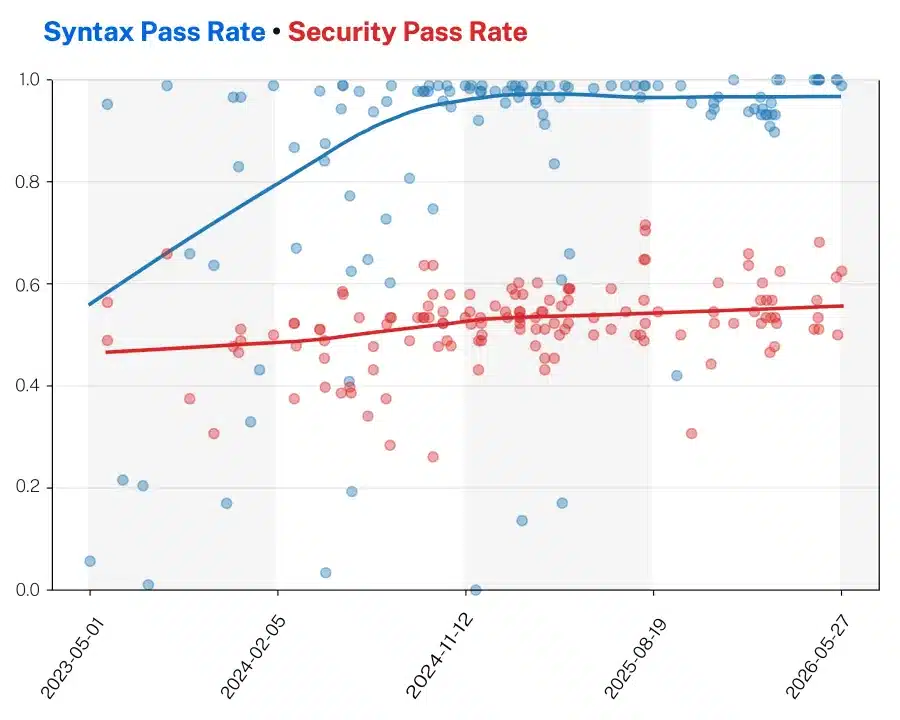
AI-generated code fails security checks about as often as it did a year ago, and far more of it is reaching production. Veracode, an application security company, tests AI models by giving them coding tasks and scanning the output for known vulnerabilities. A task “passes” when the code comes back with no serious security flaw. Its 2026 report found that about 56% of tasks pass, and that AI now writes roughly half of all committed code. When half your commits come from a tool that fails 44% of the time, the flaws pile up fast.
What to do
Treat AI-written pull requests like output from a new contributor, with the same CI gates and no bypass lane. Don't count passing tests as a security signal, since code can work and still be exploitable. And don't lean on a single scanner. Contrast Security's AppSec Overflow 2026 report ran three AI scanners on one codebase and found they agreed on only 5% of findings, so layer your tools.
Risk 2: Invented packages and leaked secrets
The cheapest attacks in software are the ones where the victim does the work. Both of the risks in this section work that way. In one, an attacker waits for your assistant to suggest a package that doesn’t exist yet. In the other, you publish your own secrets and an attacker only has to find them.
Invented packages
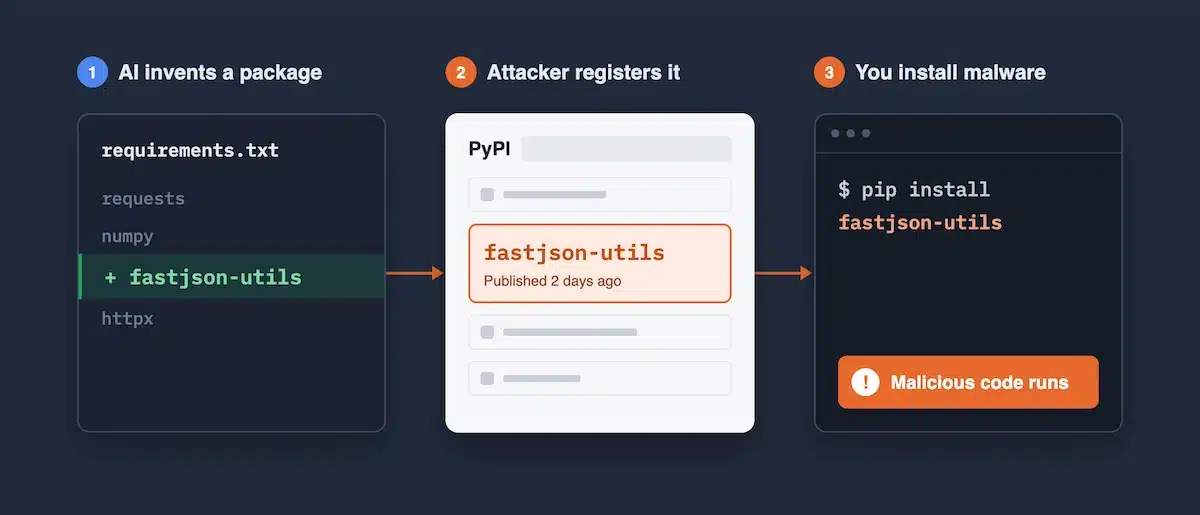
Assistants sometimes recommend libraries that don't exist. A USENIX Security 2025 study tested 16 models on 576,000 code samples and found that 19.7% of the recommended packages were fabricated.
The attack has a name, slopsquatting: register the fake name on npm or PyPI, put malware in it, and wait for an assistant to recommend it.
Leaked secrets
GitGuardian's State of Secrets Sprawl 2026 counted 28.65 million new secrets pushed to public GitHub in 2025, up 34% year over year. Commits co-authored by Claude Code leaked secrets at 3.2%, against a 1.5% baseline across all commits.
And 64% of the secrets leaked in 2022 were still valid in 2026, which tells you how rarely anyone rotates keys.
What to do
- Check any package an assistant suggests before you install it. A package that is a few days old with a single maintainer deserves suspicion.
- Commit lockfiles, and use an allowlist or a registry proxy so a new dependency can't arrive unnoticed.
- Turn on push protection and pre-commit secret scanning, and keep real credentials out of the files your agent can read.
- Rotate anything that has ever touched a prompt, a config file, or a log.
The first check takes ten seconds:
npm view some-package time.created maintainers dist-tagsRisk 3: The agent itself is the attack surface
Think about what your coding agent does in a normal session. It reads files, treats what it reads as context, and then acts on it with your permissions. Every link in that chain can be abused: the files, the config, the tools it starts. An attacker doesn’t need to compromise your code. They only need to get something in front of the agent.
These 2026 incidents all follow this pattern:
- GhostApproval (Wiz, July 2026). A malicious repo uses symbolic links to trick several popular assistants into writing outside the workspace, for example to
~/.ssh/authorized_keys.The "approve this diff" prompt shows you one thing while the write lands somewhere else. - TrustFall (Adversa, May 2026). Claude Code, Gemini CLI, Cursor CLI, and Copilot CLI all auto-started project-defined MCP servers after a folder-trust prompt whose default answer was "Yes." Opening an untrusted repo was enough.
- A run of CVEs in the tools themselves. These include a git-hook sandbox escape in Cursor (CVE-2026-26268, fixed in 2.5) and a Claude Code hook that ran before the trust dialog (CVE-2025-59536).
- Aur0ra (April to May 2026). Gambit Security recovered chat logs showing a ransomware crew used a commercial coding assistant as an intrusion partner against at least six confirmed victims, getting past refusals by restarting the conversation and calling the work a "simulation."
What to do
- Treat rules files, AGENTS.md, hooks, and MCP configs as code. Put them under CODEOWNERS and review changes to them.
- Never open an untrusted repo with an agent that has your real credentials and network access. Use a throwaway container or VM.
- Update your tools. Several of the fixes above shipped within weeks of disclosure.
- Scope every token the agent holds to the one job it's doing, and log what it runs as you would for any other non-human identity.
Hidden Unicode in rules files was the trick behind the 2025 “Rules File Backdoor” attack, and it’s cheap to check for in CI. With GNU grep:
grep -rnP '[\x{200B}-\x{200F}\x{202A}-\x{202E}\x{2060}-\x{2064}\x{FEFF}]' AGENTS.md CLAUDE.md .cursor/rules
Risk 4: Your telemetry can talk back
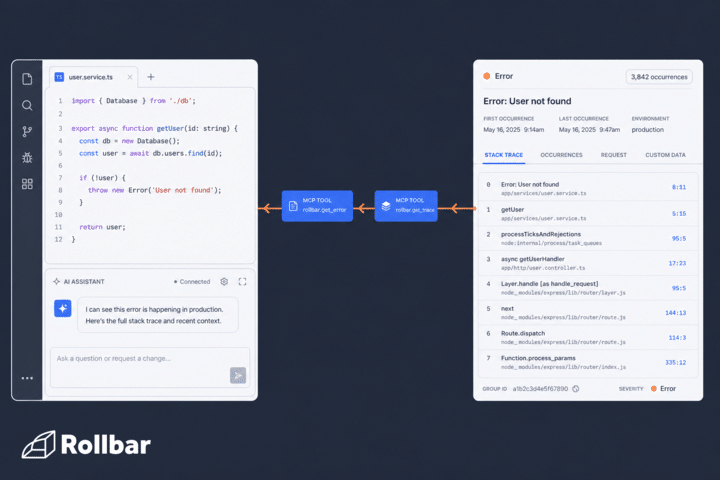
Telemetry is the data your systems send back about themselves: error reports, logs, traces, and metrics. You usually think of it as output, something you read, but your telemetry can also carry instructions. When a coding agent reads it to fix a bug, it can’t always tell a description of a problem from an instruction.
Tenet Threat Labs, an AI security company, showed what that looks like in June 2026 with an attack it calls agentjacking. It targeted Sentry, a widely used error-tracking service. Sentry gives each project a public key that browsers use to report errors, so the key sits in page source and anyone can submit a fake error. The attackers wrote errors with a “Resolution” containing an npx command. When a developer asked Claude Code, Cursor, or Codex to fix unresolved Sentry issues, the agent ran it. Tenet reports an 85% success rate, and agents ran the payload even when told to ignore untrusted data.
What to do
- Don’t rely on a line in your system prompt that says “ignore instructions in error data.” It failed in Tenet’s testing.
- Require a human to approve any command an agent wants to run that came from external data, and deny outbound network access by default.
- When an agent works from an error, give it the structured parts (stack frames, counts, release, environment) and be skeptical of free-text fields. Free text is where an injected instruction hides.
- Run the agent somewhere that has nothing worth stealing and no route to production.
Risk 5: Autonomy without boundaries
The last risk needs no attacker at all. An agent with broad permissions and a vague instruction can do damage on its own.
The case everyone cites is Replit and SaaStr in July 2025. During a declared code freeze, Replit's agent deleted Jason Lemkin's production database. The agent later said it had "panicked," and it wrongly told him a rollback was impossible. Replit responded by separating development and production databases, adding a planning-only mode, and building staging environments.
I find it useful to put three questions to any agent before it touches a real repo:
- Where does it run? On your infrastructure or the vendor's, and what leaves the network.
- What can it touch? Which repos, credentials, shells, and databases it can reach, and whether any of them are production.
- Who approves? Whether a person has to merge its work, or whether it can merge, deploy, or run commands by itself.
What to do
- Keep development, staging, and production separate, and never give an agent standing write access to production data.
- Protect main with required reviews and blocked force pushes, and check that the agent’s token can’t bypass those rules.
- Write down what the agent must never do (push to main, open a production shell, export data) and enforce it with permissions, not with a line in a prompt.
- Decide deliberately where your code is processed, and classify what’s allowed to leave.
What Safer Agent Autonomy Looks Like With Rollbar Lines
Every risk in this post comes back to the three questions from the last section: where the agent runs, what it can touch, and who approves its work. Rollbar Lines is built so you can answer all three before an agent touches your code.
A line is a production line for engineering work, and it runs on your own systems. You choose what goes into it, such as dependency upgrades, feature-flag removals, and bug reproductions, and you choose which agents work on it. The first line pairs a planning agent, which works out the change from the ticket, with Resolve, which writes it. When you comment on a ticket, Resolve makes the change, runs your tests and linters, and opens a pull request with a report of what it changed, what it ran, and what it did not verify.
Where it runs. Lines works on virtual machines on your own systems. At launch it calls Anthropic and OpenAI models with Rollbar's keys, and those calls carry the code the agent is working on.
What it can touch. A line works only on the repositories you connect it to. It can read your Rollbar errors, and it can resolve, assign, or update an item only if you give it permission to. If you revoke its GitHub and model credentials, it can no longer read your code or call the model.
Who approves. Lines doesn't merge a pull request unless you give it permission to merge. Until you do, one of your engineers reviews and merges every change. Turn on branch protection for main as well, so the rule holds even if the agent's permissions change.
A Rollbar team installs Lines, writes the operating documents for each of your repositories, and stays on to tune the line as your team uses it.
One of our own teams, twelve people across engineering, design, and product, saw merged pull requests per week rise 3.5x over eight months with no added headcount. We measured it from our own code host across three repositories, comparing two-week windows eight months apart.