

You know the drill. An error fires, you get the stack trace, and then you spend the next 45 minutes tracing it backward through four services, two config files, and a deploy that happened three hours ago. You eventually find the root cause, but the path to get there was manual, slow, and entirely dependent on how well you already knew the codebase.
We built AI-powered root cause analysis (RCA) for that kind of slog. Starting today and throughout beta, every Rollbar account on Essentials or Advanced gets a monthly AI credit pool for RCA on production errors: 4,000 credits on Essentials and 8,000 on Advanced.
No waitlist. Your monthly credits are already in your account.
On a typical item, that works out to roughly six to eight RCA runs per billing cycle on Essentials and ten to fourteen on Advanced. We sized the pools assuming you spend them on the incidents that actually block you (mostly critical and error-level items), not on every warning or info event. If RCA becomes a regular part of your workflow, you can purchase additional credits when you need them.
What RCA actually does (and what it doesn’t)
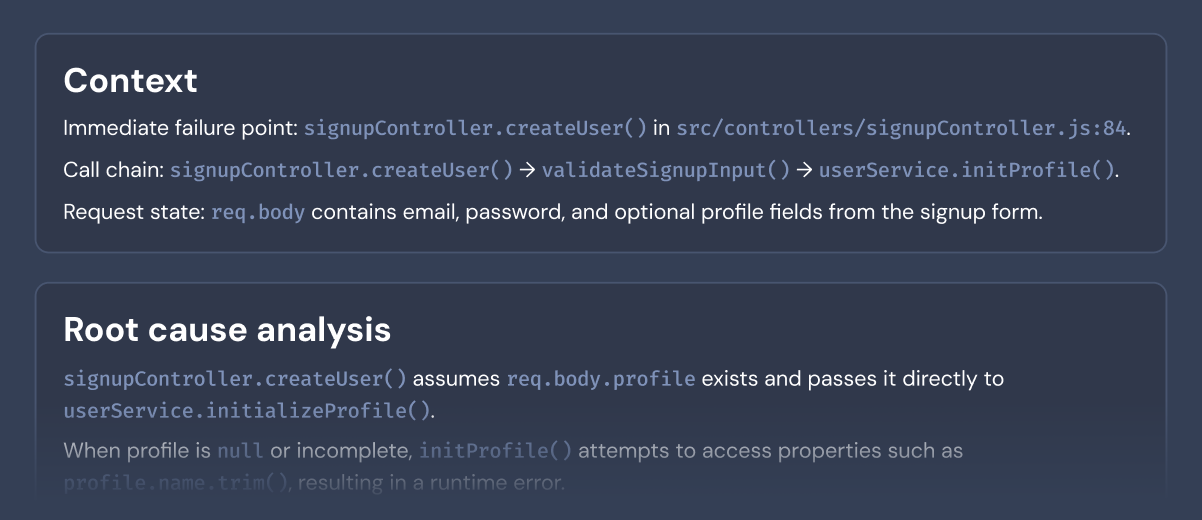
When you trigger RCA on an item, we run everything Rollbar already has for that item (stack trace, item context, recent deploys, and telemetry) through the model. You get back a probable root-cause write-up: what probably broke, where to look first, and enough framing to get you off the stack trace and into the code.
It cannot invent signals we never captured. If the real story is a config change or an environment variable that never showed up in Rollbar, the model will not pull that out of thin air. Treat the output as a strong hypothesis you still verify before you ship a fix. In our internal testing, the first suggestion usually sent us to the right neighborhood (and most times the right line) in the code. That cuts down the aimless spelunking you do before you even know which subsystem to blame, which matters most on errors you have not seen before or in codebases you did not write.
The analysis runs on demand. You choose which errors to spend credits on. It’s not running in the background burning through your allocation on every warning-level event.
Where RCA fits into your debugging workflow
RCA isn’t replacing your debugging process. It shrinks the opening act, the part where you are still asking why this happened before you can ask how to fix it.
Here’s the workflow:
- An error appears in your Rollbar Items feed
- You open the item and see the stack trace, telemetry, and occurrence data you’re used to
- You trigger RCA, and the model works from the item context, linked code where we have it, and recent changes
- You get a readable probable-cause write-up with pointers to the relevant code
- You verify and fix, or use the explanation to dig deeper if the first pass didn’t nail it
You get the most mileage on the errors that are hardest to debug: unfamiliar code paths, cross-service messes, or things that only reproduce under specific conditions. That is where a long investigation often collapses into a short read.
RCA is the first phase of the workflow we are building
What you get today is the diagnosis phase: you trigger RCA when you want a grounded theory of what broke, with pointers into the code.
The next phase is Rollbar Resolve: an agent that starts from production errors in Rollbar, works in your codebase, and aims for a tested change you review as a normal pull request. Same universe of context RCA uses, but the outcome shifts from “here is what probably went wrong” to “here is a proposed fix, already exercised in isolation, ready for your review.” That is the fuller workflow we are building, from understanding the error to merging a fix, with you still deciding what the agent is allowed to touch.
Resolve is in closed alpha. If you want early access and you are willing to give blunt product feedback, read the details and sign up.
Try it on your next production error
Your credits are already in your account. Log in, open an error item, and trigger RCA. If you’re on an Essentials plan, you’ve got 4,000 credits to work with this month. Advanced plans have 8,000.
Skip the toy repro. Run it on something you are already debugging, ideally one that has been sitting in your feed where the stack shows what blew up but not why. That is a fair test of whether it saves you time.
We will see how this gets used in the wild and adjust from there. If the analysis misses the mark or you have a strong opinion on what RCA should do next, contact us and let us know.
