Your Python app is throwing errors in production right now. Some of them are obvious: a 500 response, an angry Slack message from support. But most are quiet. A background task swallows an exception. A race condition surfaces only under load. A third-party API returns unexpected data and your code handles it by not handling it.
If you’re relying on log files and user reports to find these, you’re debugging after the damage is done.
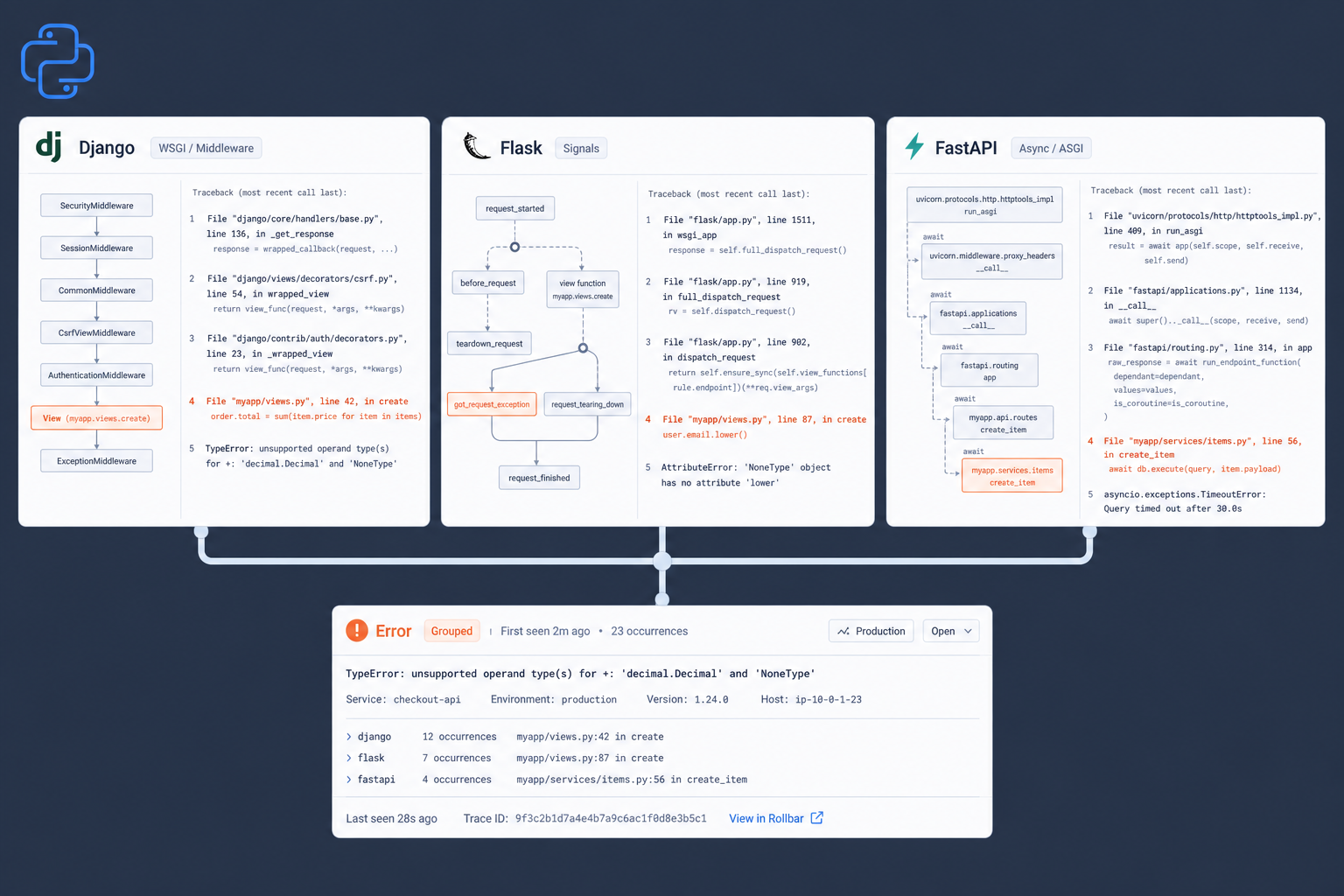
This guide walks you through setting up error tracking in the three most common Python web frameworks: Django, Flask, and FastAPI. By the end, you’ll have automatic error capture, release-aware grouping, and enough context in each error report to skip the reproduction step and go straight to the fix.
What you need before starting
- Python 3.8+ (all three frameworks require it)
- A Rollbar account with a project created. Sign up free
- Your project’s server-side access token from the Rollbar dashboard (Settings > Project Access Tokens > post_server_item)
- pip for package installation
Store your access token in an environment variable. Never commit it to version control.
export ROLLBAR_ACCESS_TOKEN='your_post_server_item_token'
Why Python’s built-in exception handling is not enough
Python gives you try/except blocks and the logging module. Both are useful. Neither is error tracking.
Here’s the gap: logging.error() writes a line to a file or stdout. It doesn’t deduplicate. It doesn’t group. It doesn’t tell you which deploy introduced the error, how many users are affected, or whether this same exception has been happening since Tuesday. You get a timestamp and a message. You’re left to grep, correlate, and guess.
Error tracking gives you:
- Automatic grouping so the same root cause appears as one item, not 4,000 log lines
- Stack traces with local variables so you can see state at the moment of failure
- Release correlation so you know which deploy introduced a regression
- Alert routing so the right person gets notified, not a shared channel that everyone ignores
The setup for each framework takes less than five minutes.
Django: middleware-based error capture
Django’s middleware pipeline makes error tracking straightforward. Rollbar’s Django middleware catches unhandled exceptions at the request/response boundary and reports them with the full request context attached.
Step 1: Install the SDK
pip install rollbar
Step 2: Add the middleware and configuration to settings.py
Add Rollbar’s middleware as the last item in your MIDDLEWARE list. This ensures it catches exceptions that pass through all other middleware.
# settings.py

import os

MIDDLEWARE = [
    'django.middleware.security.SecurityMiddleware',
    'django.contrib.sessions.middleware.SessionMiddleware',
    'django.middleware.common.CommonMiddleware',
    'django.middleware.csrf.CsrfViewMiddleware',
    'django.contrib.auth.middleware.AuthenticationMiddleware',
    'django.contrib.messages.middleware.MessageMiddleware',
    'django.middleware.clickjacking.XFrameOptionsMiddleware',
    # Rollbar should be last so it catches exceptions from all middleware above
    'rollbar.contrib.django.middleware.RollbarNotifierMiddleware',
]

ROLLBAR = {
    'access_token': os.environ.get('ROLLBAR_ACCESS_TOKEN'),
    'environment': 'development' if DEBUG else 'production',
    'code_version': os.environ.get('COMMIT_SHA', 'unknown'),
    'root': os.path.dirname(os.path.dirname(os.path.abspath(__file__))),
}
That’s it for basic setup. Every unhandled exception in your views, middleware, and template rendering now gets reported with the full stack trace, request headers, POST data, and the user’s session info.
Step 3: Capture errors outside of requests
Django views aren’t the only place things break. Background tasks, management commands, and Celery jobs run outside the request/response cycle. Use Rollbar’s logging handler to catch those.
# settings.py

LOGGING = {
    'version': 1,
    'disable_existing_loggers': False,
    'filters': {
        'require_debug_false': {
            '()': 'django.utils.log.RequireDebugFalse',
        },
    },
    'handlers': {
        'rollbar': {
            'filters': ['require_debug_false'],
            'access_token': os.environ.get('ROLLBAR_ACCESS_TOKEN'),
            'environment': 'production',
            'class': 'rollbar.logger.RollbarHandler',
        },
    },
    'loggers': {
        'django': {
            'handlers': ['rollbar'],
            'level': 'ERROR',
            'propagate': True,
        },
        'myapp.tasks': {
            'handlers': ['rollbar'],
            'level': 'ERROR',
            'propagate': True,
        },
    },
}
Now any logger.error() or logger.exception() call in your task code gets reported to Rollbar alongside your view-level exceptions.
Filtering noisy 404s
By default, the middleware reports 404 errors. If bots hitting /wp-admin or /xmlrpc.php are creating noise, you can filter them:
import re

ROLLBAR = {
    'access_token': os.environ.get('ROLLBAR_ACCESS_TOKEN'),
    'environment': 'production',
    'code_version': os.environ.get('COMMIT_SHA', 'unknown'),
    'root': os.path.dirname(os.path.dirname(os.path.abspath(__file__))),
    'ignorable_404_urls': (
        re.compile(r'/wp-admin'),
        re.compile(r'/xmlrpc\.php'),
        re.compile(r'\.env'),
    ),
}
Alternatively, use RollbarNotifierMiddlewareExcluding404 as the last middleware and RollbarNotifierMiddlewareOnly404 as the first. This lets your other middleware handle 404s before they reach Rollbar, so only genuinely unhandled 404s get reported.
Flask: signal-based error capture
Flask uses Blinker signals for exception handling. Rollbar hooks into got_request_exception to capture errors automatically.
Step 1: Install the SDK and dependencies
pip install rollbar Flask blinker
The blinker package is required for Flask’s signal system. Without it, exception signals won’t fire and Rollbar won’t capture errors automatically.
Step 2: Initialize Rollbar in your app factory
# app.py

import os
import rollbar
import rollbar.contrib.flask
from flask import Flask, got_request_exception

def create_app():
    app = Flask(__name__)

    # Initialize Rollbar
    rollbar.init(
        access_token=os.environ.get('ROLLBAR_ACCESS_TOKEN'),
        environment='production',
        code_version=os.environ.get('COMMIT_SHA', 'unknown'),
        root=os.path.dirname(os.path.realpath(__file__)),
        allow_logging_basic_config=False,
    )

    # Connect Rollbar to Flask's exception signal
    got_request_exception.connect(rollbar.contrib.flask.report_exception, app)

    @app.route('/')
    def index():
        return 'OK'

    @app.route('/error')
    def trigger_error():
        # This will be automatically reported to Rollbar
        raise RuntimeError('Something went wrong')

    return app
Every unhandled exception in a Flask route now gets reported with the request URL, method, headers, and form data included.
Step 3: Report caught exceptions manually
Not every error should crash the request. For exceptions you catch and handle gracefully, report them explicitly:
import sys
import rollbar

@app.route('/checkout')
def checkout():
    try:
        charge = payment_provider.charge(amount=cart.total)
    except payment_provider.CardDeclinedError:
        # Expected, handle it
        return render_template('card_declined.html'), 400
    except Exception:
        # Unexpected payment failure: report it, but don't crash
        rollbar.report_exc_info(sys.exc_info())
        return render_template('payment_error.html'), 500

    return render_template('success.html', charge=charge)
The report_exc_info() call sends the full stack trace and local variables from the exception context. You get the same detail as an uncaught exception, but you keep control of the user experience.
FastAPI: async-native error capture
FastAPI runs on ASGI with async handlers, so error tracking needs to work with the event loop. Rollbar’s FastAPI integration supports async reporting out of the box.
Step 1: Install the SDK
pip install rollbar httpx python-multipart
httpx enables the async handler so error reports don’t block your request processing. python-multipart is a FastAPI requirement for parsing request bodies.
Step 2: Add the Rollbar middleware
The middleware approach works with all FastAPI versions and catches uncaught exceptions across all routes.
# main.py

import os
import fastapi
import rollbar
from rollbar.contrib.fastapi import ReporterMiddleware as RollbarMiddleware

rollbar.init(
    os.environ.get('ROLLBAR_ACCESS_TOKEN'),
    environment='production',
    code_version=os.environ.get('COMMIT_SHA', 'unknown'),
    handler='async',
)

app = fastapi.FastAPI()
app.add_middleware(RollbarMiddleware)  # Add as the first middleware

@app.get('/')
async def root():
    return {'status': 'ok'}

@app.get('/error')
async def trigger_error():
    # This uncaught exception will be reported to Rollbar automatically
    result = 1 / 0
    return {'result': result}
Add RollbarMiddleware as the first middleware in FastAPI (the opposite of Django). This is because ASGI middleware wraps in reverse order: the first middleware added is the outermost layer, so it catches exceptions from everything inside it.
Alternative: router-based integration
If you need request body content in your error reports (the middleware can’t access streaming content), use the router integration instead. This requires FastAPI 0.41.0 or later.
import os
import fastapi
import rollbar
from rollbar.contrib.fastapi import add_to as rollbar_add_to

rollbar.init(
    os.environ.get('ROLLBAR_ACCESS_TOKEN'),
    environment='production',
    code_version=os.environ.get('COMMIT_SHA', 'unknown'),
    handler='async',
    include_request_body=True,
)

app = fastapi.FastAPI()
rollbar_add_to(app)  # Must be called before adding routes

@app.post('/webhooks/stripe')
async def handle_stripe_webhook(request: fastapi.Request):
    body = await request.json()
    # Process webhook; any uncaught exception includes the request body
    process_event(body)
    return {'received': True}
Step 3: Combine with Python’s logging module
For errors in background tasks, scheduled jobs, or startup logic that runs outside of request handlers:
import logging
import rollbar
from rollbar.logger import RollbarHandler

# Initialize Rollbar (same as above)
rollbar.init(
    os.environ.get('ROLLBAR_ACCESS_TOKEN'),
    environment='production',
    handler='async',
)

logger = logging.getLogger(__name__)
logger.setLevel(logging.DEBUG)

# Send ERROR and above to Rollbar
rollbar_handler = RollbarHandler()
rollbar_handler.setLevel(logging.ERROR)
logger.addHandler(rollbar_handler)

async def sync_inventory():
    try:
        await inventory_service.pull_latest()
    except ConnectionError:
        logger.exception('Inventory sync failed: upstream connection refused')
        # This gets reported to Rollbar via the logging handler
Track deploys so errors have release context
Error tracking without release context is like reading a stack trace without line numbers. You can see what broke, but you can’t connect it to a change.
Add deploy tracking to your CI/CD pipeline so Rollbar knows which version is running. Here’s the curl command you can add to any deployment script:
# Add to your deploy script or CI pipeline
curl -s https://api.rollbar.com/api/1/deploy \
  -F access_token=$ROLLBAR_ACCESS_TOKEN \
  -F environment=production \
  -F revision=$(git rev-parse HEAD) \
  -F local_username=$(whoami) \
  -F comment="Deployed via CI"
Once deploy tracking is active, Rollbar shows you:
- Which deploy introduced a new error
- Error rate changes after each release
- Automatic regression detection when a resolved error reappears in a new version
This turns error tracking from a reactive tool (“something broke”) into a release safety net (“this deploy broke something, and here’s what”).
Add custom context to make errors actionable
A stack trace tells you where an error happened. Custom context tells you why. Add data that makes triage faster.
Attach the current user
# Works in any framework
import rollbar

def get_rollbar_person():
    """Return user context for Rollbar error reports."""
    # Replace with your auth system's current user lookup
    user = get_current_user()
    if user:
        return {
            'id': str(user.id),
            'username': user.username,
            'email': user.email,
        }
    return None

rollbar.init(
    access_token=os.environ.get('ROLLBAR_ACCESS_TOKEN'),
    environment='production',
    person_fn=get_rollbar_person,
)
Send extra data with specific errors
try:
    order = process_order(cart)
except InventoryError as e:
    rollbar.report_exc_info(
        extra_data={
            'cart_id': cart.id,
            'sku_count': len(cart.items),
            'total_value': str(cart.total),
            'warehouse': cart.fulfillment_center,
        }
    )
    raise
Now when you see this error in Rollbar, you don’t just see “InventoryError at line 47.” You see which cart, how many items, the dollar value, and which warehouse. That’s the difference between “investigate later” and “fix now.”
What you now have
After following this guide, your Python application reports errors automatically:
- Django catches exceptions via middleware at the request boundary and via the logging handler for background work
- Flask hooks into Blinker signals to capture route-level exceptions with full request context
- FastAPI uses async-aware middleware (or router integration) to report errors without blocking the event loop
Each error arrives in Rollbar with a grouped stack trace, local variables, request data, and release information. Regressions after deploys get flagged automatically.
For detailed configuration options (rate limiting, scrubbing sensitive fields, custom fingerprinting), see the pyrollbar configuration reference.
Ready to set it up? Create a free Rollbar account and get your first error reported in under five minutes.
Sources
- Rollbar Python SDK docs
- Rollbar Django integration docs
- Rollbar Flask integration docs
- Rollbar FastAPI integration docs
- Brand knowledge base (voice-and-tone.md, messaging framework)