

{: .highlightbox}
Read our new blog Announcing Laravel error monitoring with Rollbar!
About 6 months ago I inherited a project (let’s call it Project Mayhem) that was grossly neglected
by the original developer. I won’t go into too many details, but let’s just say that I’ve seen
spaghetti with more order than this codebase had. No unit tests, no documentation, illogical
architecture, and an expecting client… I felt like I was literally living in one of those nightmares
where I’m late for the final exam in a class I passed a decade ago.
The icing on this terrible cake was that I also inherited the hosting and was graciously provided
with absolutely no specs in order to replicate the previous production environment. I was flying
blind, and if it weren’t for Rollbar's php error logging tools, this project
would have crashed and burned long before I could make any meaningful changes to it. I was able to
manage and prioritize exceptions as they happened, which gave me the information I needed to build
out a proper hosting architecture and quickly fix existing issues in the codebase.
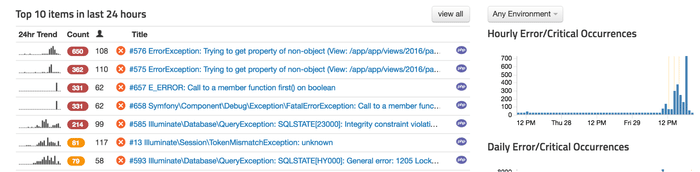
Suffice it to say, I am a big fan of Rollbar.
Luckily for me, Project Mayhem was built on Laravel, an increasingly popular
PHP framework with an impressive array of third-party plugins; one of which just so happens to be
made specifically for Rollbar. Getting Rollbar
setup on Laravel was as simple as running just a few commands, but what if the project wasn’t built
on Laravel? What if it was a “bespoke” PHP application?
{: .highlightbox}
Since this blog was written, we've released a new Laravel Notifier{:target="_blank"}.
Well… Rollbar thought of that. They’ve built out a PHP
client for their API that allows developers to quickly and easily integrate Rollbar with their
applications. To get started, all you have to do is require "rollbar/rollbar": "~0.15.0 in your
composer.json file and (like all Composer plugins) you’re good to go!
{
    "require": {
        "rollbar/rollbar": "~0.15.0"
    }
}
The interesting thing about the way the Rollbar PHP client works is that (unless otherwise
specified) it will automatically catch your exceptions; you do not have to send them up manually.
No muss, no fuss. All you have to do is add the following code to your application’s entry point
(typically a bootstrap file or index file):
$config = array( 'access_token' => 'POST_SERVER_ITEM_ACCESS_TOKEN' Rollbar::init($config);What this little piece of code does is install an exception handler in PHP which catches every
exception thrown and sends it up to Rollbar. I should note here that the configuration can be
much more in-depth, but I’m only showing the bare-bones to get you started.
While nothing else needs to be done in order to start enjoying the benefits of Rollbar in your PHP
application, you can still manually send up data by simply calling the report_method() function.
Rollbar::report_message(’Stuff and things.', Level::WARNING);The beauty of this method is that it gives you the ability to send supplementary, non-critical data
up to Rollbar. Warnings, internal errors, bad data, attempted security breaches. You can easily send
any useful data up to Rollbar with minimal effort, and save yourself hours of headache.
If you haven’t already, signup for a 14-day free trial of Rollbar and let us help you
defeat annoying laravel errors in your PHP applications. 🙂
