Every app breaks eventually. A button stops working. A checkout flow throws an exception. An API returns a 500 error at 2 AM on a Saturday. The question isn't whether your app will have bugs; it's whether you'll find out before your users do.
That's exactly what error tracking is for.
What is an Error in Software, Anyway?
Before we get into tracking them, let's make sure we're on the same page about what an "error" actually means in this context.
In software, errors are unexpected problems that occur while your application is running. They come in a few flavors:
| Runtime errors | Unhandled rejections | Crashes | Logic errors |
|---|---|---|---|
| Something crashes while the code is executing (a null pointer, an unhandled exception, a failed database query). | A promise in JavaScript goes sideways and nobody catches it. | The whole app (or a critical part of it) just... stops. | The app runs fine but produces the wrong result (sneaky, and harder to catch). |
Errors can happen on the client side (in your user's browser or mobile app) or the server side (in your backend, APIs, or infrastructure). Client-side errors affect what users see and interact with; server-side errors affect the data and logic powering everything underneath.
Here's the important thing: errors are not a sign of bad engineering. Every production system has them.
So, What Is Error Tracking?
Error tracking is the practice of automatically capturing, grouping, and alerting on errors that occur in your running application, so you can find and fix them before they do damage.
When an error happens in production, your error tracking tool should catch it in real time, record exactly what went wrong (including the stack trace, the line of code, the user's environment, and what they were doing), group it with similar errors, and notify your team - all without you having to dig through a haystack of logs.
Think of it as a smoke detector for your app. You don't sit around watching for smoke 24/7. The detector does that for you, and it only wakes you up when something actually needs your attention.
Error Tracking Tools vs. Just Looking at Logs
At this point, you might be thinking: "Wait, can't I just check my logs?"
Technically, yes. Practically, no - or at least, not on its own.
The problem with relying on logs alone
Logs are incredibly useful, but they're not designed to answer the questions you actually care about when something breaks:
- How many users are hitting this error?
- Is this a new problem or one that's been lurking for weeks?
- Which deploy introduced it?
- Is it getting worse?
Logs give you a raw stream of events. Error tracking gives you signal. It groups similar errors together (so you see "this error has happened 847 times" instead of 847 separate log lines), connects errors to the specific line of code that caused them, tracks trends over time, and tells you who was affected.
Error tracking doesn't replace logging, it complements it. Logs help you investigate; error tracking helps you notice there's something to investigate in the first place.
Error Tracking vs. Performance Monitoring
Error tracking isn't the only way to monitor what's happening in your app. You'll often see it mentioned alongside two other approaches, APM and RUM. Here's how they differ:
Application Performance Monitoring (APM)
APM tools track how your app is performing: response times, latency, throughput, database query speed. They tell you your app is slow. Error tracking tells you your app is broken.
Real User Monitoring (RUM)
RUM captures what real users experience in their browsers or devices: page load times, interaction delays, that sort of thing. Again, useful for performance; not designed for catching exceptions.
Error Tracking
Error tracking is laser-focused on failures - exceptions, crashes, and unhandled errors - with the code-level detail you need to actually fix them.
In a mature stack, you'd likely use all three together. But if you're just getting started and want the most actionable signal fastest, error tracking is where to begin.
How Error Tracking Actually Works
Here's the basic flow, from error to resolution:
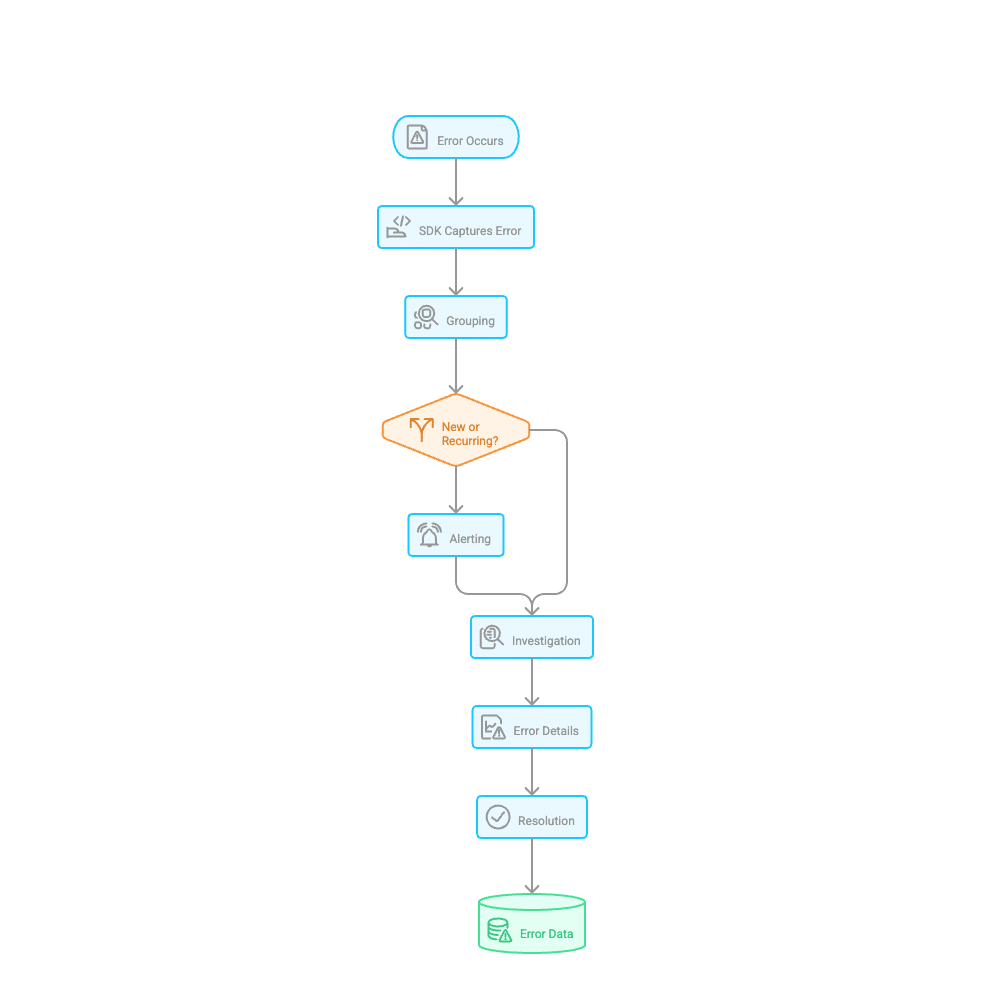
- Error occurs in your production app (a user hits a broken endpoint, an exception gets thrown, a mobile app crashes)
- SDK captures it — a lightweight library in your code catches the error and sends it to the error tracking service, along with context: stack trace, environment, browser/OS, user ID, request data
- Grouping — the tool clusters this error with similar ones, so you know if it's a new issue or a recurring one
- Alerting — your team gets notified through Slack, email, PagerDuty, or wherever you work
- Investigation — you click into the error and see exactly where it happened, in which deploy, and what the user was doing right before it broke
- Resolution — you fix it, mark it resolved, and the tool watches to make sure it doesn't come back
The whole system runs in the background, continuously, without anyone having to manually check a dashboard or tail a log file.
What to Look for in an Error Tracking Tool
Not all error tracking tools are created equal. Here's what matters:
Real-time alerts you can actually trust
You want to know the moment something breaks, not an hour later, and not through a flood of duplicate notifications. Good tools let you configure alerts so you're only woken up for things that actually need your attention.
Smart grouping and deduplication
A single bug can generate thousands of error events. Your tool should group them intelligently - by stack trace, error message, or fingerprint - so you see one issue, not a thousand lines of noise.
Code-level context
The best tools don't just tell you that something broke. They tell you the exact line of code, the commit that introduced it, and (in some cases) who last touched that part of the codebase. That's the difference between a useful alert and a treasure hunt.
Trend visibility
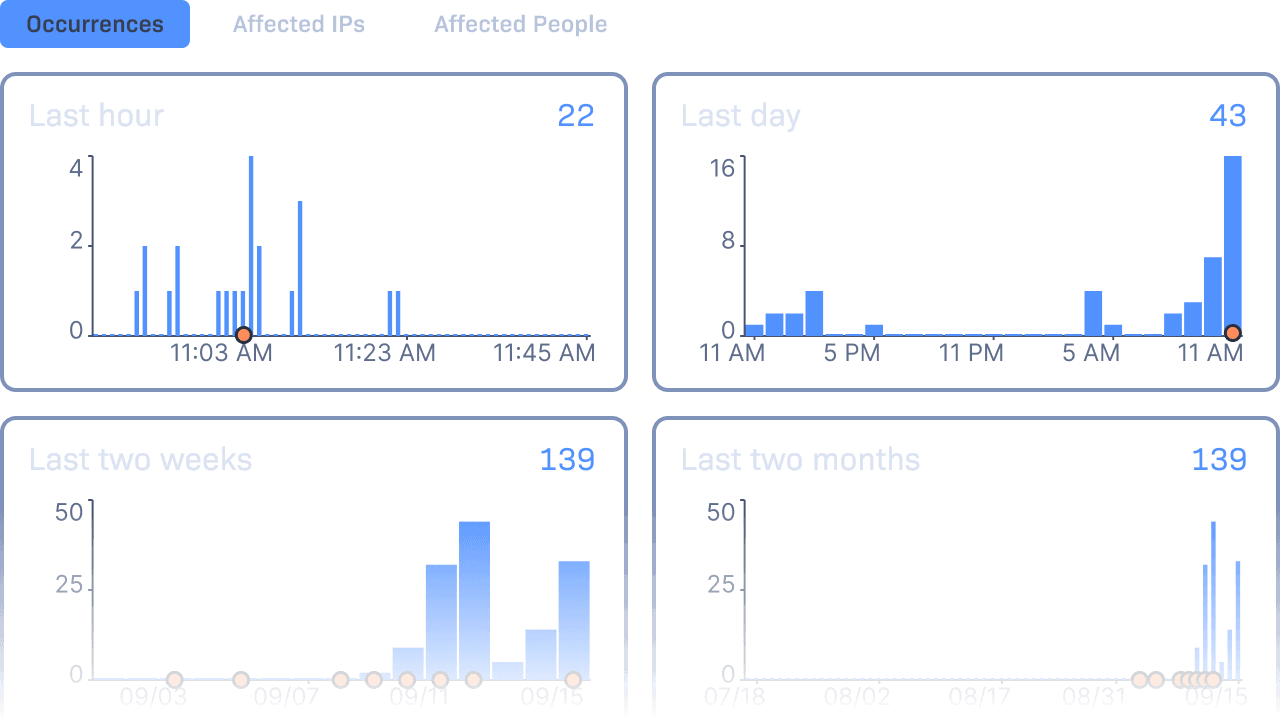
Is this error getting worse? Happening more frequently after a recent deploy? Affecting a growing number of users? Dashboards that show error trends over time let you prioritize smarter.
Integrations with your existing workflow
Your team already lives in Slack, GitHub, Jira, or some combination thereof. A good error tracking tool meets you there, pushing alerts to Slack, linking to the relevant commit in GitHub, and auto-creating tickets in your issue tracker.
Error Tracking Best Practices
Getting the tool set up is the easy part. Getting real value from it takes some thought about how you use it.
Set meaningful alert thresholds
Not every error needs to wake someone up at 3 AM. Configure alert rules based on impact: error rate, number of affected users, or severity. Reserve high-urgency alerts for things that are genuinely on fire.
Triage by user impact
Two bugs walk into a bar. One affects three internal beta testers. The other affects 40% of your checkout flow. Prioritize accordingly. Good error tracking tools show you affected user counts, so you're never flying blind on this.
Assign errors to owners
An error without an owner is an error that doesn't get fixed. When a new issue comes in, route it to a specific team or individual. Don't let it sit in a shared queue hoping someone picks it up. Your tool should integrate with your issue tracker and push assigned errors straight into tickets so they're visible alongside the rest of the team's work.
Resolve, don't just silence
It's tempting to mute a noisy error and move on. Resist. If an error is happening, it means something is broken for someone. Mark things as resolved when they're actually fixed and then let the tool alert you if they regress after a new deploy.
Track errors across environments
Production is the one that matters most, but catching errors in staging before they reach users is even better. Set up error tracking in all your environments and treat staging errors as an early warning system.
Start Tracking Errors with Rollbar
Rollbar is an error monitoring platform built specifically for developers who care about what they ship. It captures errors in real time, groups them intelligently to cut through the noise, and gives you code-level context - the exact line, the deploy it appeared in, and who last touched it - so you can fix issues with confidence instead of guesswork.
Rollbar integrates with the tools you're already using: Slack, PagerDuty, GitHub, GitLab, Jira, Asana, and more. It supports a wide range of languages and frameworks including JavaScript, Python, React, Node.js, PHP, Java, and many others, so wherever your stack lives, Rollbar can see it.
And if you want a glimpse at where error monitoring is heading: Rollbar is building Resolve, an AI agent that goes beyond detection. Resolve reviews your codebase, figures out what's causing the error, applies the fix in an isolated environment, runs your tests, and opens a pull request for your team to review. You stay in control; it just handles the tedious part. The goal is a mean time to resolve that's close to zero.
Getting started is free. Our free tier includes 5,000 error occurrences per month, and full access is available for 14 days with no credit card required. Setup takes minutes, not days.